| Post Reply | RetroFed Forum Forum Index » Fediverse |
| Author | Message | ||
|---|---|---|---|
 Blaze
piefed.zip
Blaze@piefed.zip
Blaze
piefed.zip
Blaze@piefed.zipJoined: 2025-06-13 |
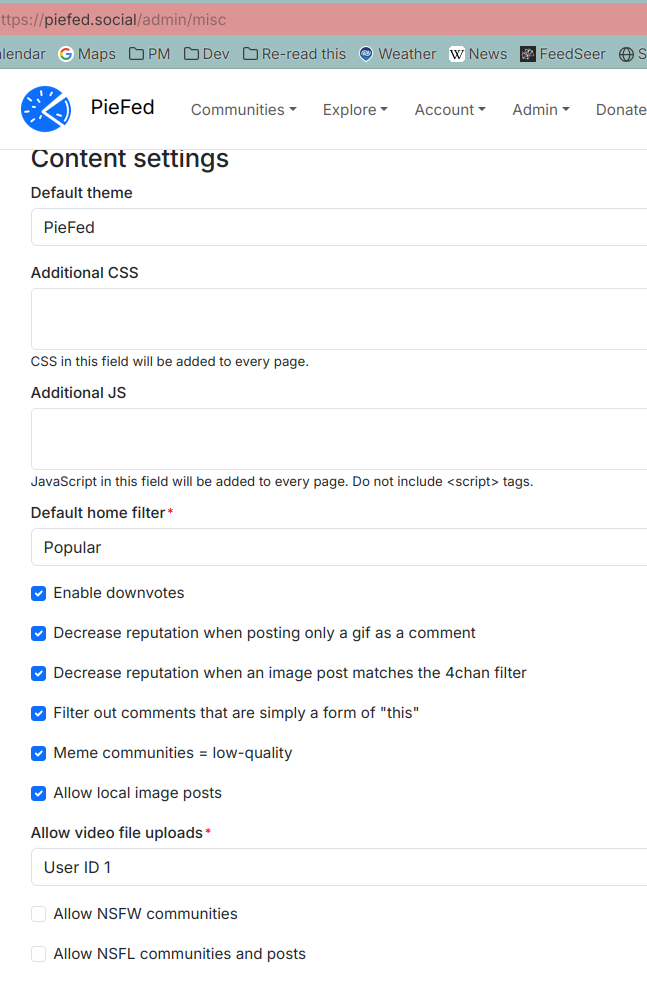
Edit about the 4chan image blocking, I asked Rimu directly:
https://chat.piefed.social/#narrow/channel/3-general/topic//near/10529 -- A few people in the other thread assumed that it was required to fork the code to disable those filters. That's not the case, the filters can be configured, and are off by default. To hide the reputation system, here's a line of CSS that admins can add in the admin area to hide it for every user That CSS line can also be used by any user wanting to hide the score at the user level. |
||
| 1 Original | |||
| Post Reply |
Back to top |