Xorg doesn't display in gentoo
| Post Reply | RetroFed Forums Forum Index » Linux |
| Author | Message | ||
|---|---|---|---|
|
UninterestingVoid reddthat.com UninterestingVoid@reddthat.com Joined: 2026-07-17 |
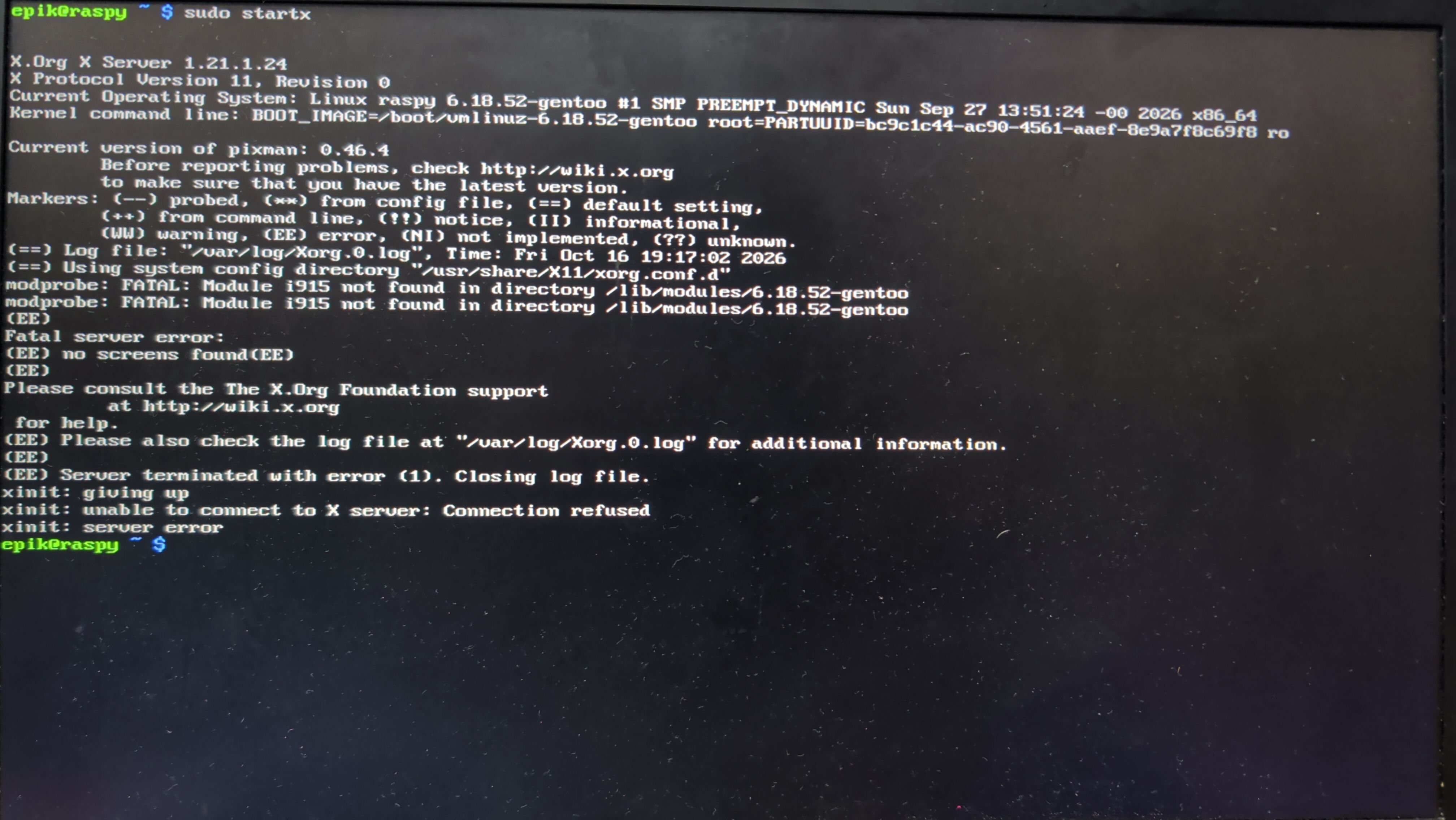
so the output
and the log from /var/log/Xorg.0.log CPU: Intel (R) Core(TM) i7-8565 (4) @ 4.60 GHz GPU: Intel UHD Graphics 620 [Integrated] Kernel: Linux 6.18.52-gentoo 914 packages from emerge apparently I have tried doing some stuff but I really don't think it made a difference in any possible way. There's also when keyword ~amd64 blocks stuff like kde. From what I understand there's also a stable amd64 apparently? idk that's a bit unrelated I will look into it later. |
||
| 16 Original | |||
|
Aary lemmy.ml aary@lemmy.ml Joined: 2026-05-17 |
You need to load module for your video card, i think. Or dri, or do something with your kernel.
Or with the config... |
||
| 5 | |||
|
vas lemmy.ml vas@lemmy.ml Joined: 2025-08-12 |
You need to load module for your video card, i think. Or dri, or do something with your kernel. Device(s) detected, but none match those in the config file. Or with the config...
Indeed. I don't know gentoo, but from the logs it seems that the failure somes from not being able to load the drivers. Install them first? |
||
| 2 | |||
|
elmicha feddit.org elmicha@feddit.org Joined: 2024-06-27 |
|
||
| 4 | |||
|
handleunknown lemmy.world handleunknown@lemmy.world Joined: 2023-07-30 |
/dev/dri/card0 is missing, try modprobe i915.
Or if you are building your kernel make sure the Intel graphics modules are compiled. Do a sanity check and recheck the Gentoo Intel wiki |
||
| 5 | |||
|
Aiwendil lemmy.ml  Aiwendil@lemmy.ml Joined: 2021-04-27 |
https://wiki.gentoo.org/wiki/Intel#X_drivers What do you have in your VIDEO_CARDS variable in your portage settings? Edit: Also if you configured your own kernel make sure to look at the section above the one i linked if you have everything needed enabled in your kernel config. Edit2: About the ~amd64 keyword...gentoo packages come in two "branches". The stable and the testing branch. Normally you install a package in the stable version. But if you want you can set the ~amd64 keyword for a package and you get the testing version ( https://wiki.gentoo.org/wiki/ACCEPT_KEYWORDS ). You can mix stable and testing package on your system as you like...but often testing packages will require other testing packages to be installed. For KDE for example plasma 6.8 is currently the testing version and 6.6.6 and 6.7.5 are the stable versions (you can pick which one you want). I really recommend you read the "Working with gentoo" and "Working with portage" section of the handbook...they explain most of this. |
||
| 5 | |||
|
nyan sh.itjust.works nyan@sh.itjust.works Joined: 2024-03-22 |
Or if you are building your kernel make sure the Intel graphics modules are compiled. Do a sanity check and recheck the Gentoo Intel wiki
Also make sure you have the correct Intel module (there's two or three, although some cards work with more than one) and check for missing firmware, in the event the card requires any. Should all be on the wiki page linked above. |
||
| 4 | |||
|
UninterestingVoid reddthat.com UninterestingVoid@reddthat.com Joined: 2026-07-17 |
/dev/dri/card0 is missing, try modprobe i915.
|
||
| 1 | |||
|
UninterestingVoid reddthat.com UninterestingVoid@reddthat.com Joined: 2026-07-17 |
https://wiki.gentoo.org/wiki/Intel#X_drivers What do you have in your VIDEO_CARDS variable in your portage settings? Edit: Also if you configured your own kernel make sure to look at the section above the one i linked if you have everything needed enabled in your kernel config. Edit2: About the ~amd64 keyword...gentoo packages come in two "branches". The stable and the testing branch. Normally ...
/etc/portage/package.use/00video said It still does not work but at this point it probably is the kernel i would assume idk. also yea ty. |
||
| 2 | |||
|
UninterestingVoid reddthat.com UninterestingVoid@reddthat.com Joined: 2026-07-17 |
Indeed. I don't know gentoo, but from the logs it seems that the failure somes from not being able to load the drivers. Install them first?
The xorg drivers are installed btw. |
||
| 0 | |||
|
Aiwendil lemmy.ml Aiwendil@lemmy.ml Joined: 2021-04-27 |
/etc/portage/package.use/00video said */* VIDEO_CARDS: -* intels but now it says */* VIDEO_CARDS: -* intel and i ran emerge --ask --changed-use --deep @world. It still does not work but at this point it probably is the kernel i would assume idk. also yea ty.
Missing kernel config is a good guess at this point. If this is your first gentoo install I would recommend using the distribution kernel at first without manual configuration. It makes it easier to setup your system first to a usable state and then later you can still do a manual kernel config but at least have a back-up kernel that works until you get the manual config right. |
||
| 2 | |||
|
Cyclohexane Moderator cyclohexane@lemmy.ml Joined: 2021-12-27 |
I suspect something with your kernel, whether it's the kernel config, modules, or initramfs setup. |
||
| 2 | |||
|
vas lemmy.ml vas@lemmy.ml Joined: 2025-08-12 |
The xorg drivers are installed btw.
No, I mean the drivers for the graphics card. Xorg is a layer higher than that.. |
||
| 1 | |||
| Post Reply | Page 1 |
Powered by RetroFed · PieBB frontend
· All times are Europe/Amsterdam