| Post Reply | RetroFed Forum Forum Index » techsupport |
| Author | Message | ||
|---|---|---|---|
 OrangePumkin
piefed.nl
OrangePumkin@piefed.nl
OrangePumkin
piefed.nl
OrangePumkin@piefed.nlJoined: 2026-05-13 |
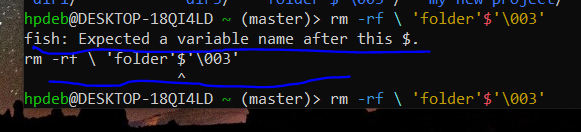
|
||
| 2 Original | |||
|
fartsparkles
lemmy.world
fartsparkles@lemmy.world Joined: 2023-07-01 |
The quotes and escapes are mangled.
|
||
| 2 | |||
|
deadbeef79000
lemmy.nz
deadbeef79000@lemmy.nz Joined: 2023-06-17 |
It's just not escaped properly. You can probably just get away with putting a backslash |
||
| 4 | |||
|
OrangePumkin
piefed.nl
OrangePumkin@piefed.nl Joined: 2026-05-13 |
The quotes and escapes are mangled. cd into the directory with the folder to remove, type rm -rf ./ then press tab until the folder you’re looking for is autocompleted after the ./
Doesn't seem to work. |
||
| 1 | |||
|
fartsparkles
lemmy.world
fartsparkles@lemmy.world Joined: 2023-07-01 |
Doesn't seem to work.
If you’re struggling, might as well either open a file manager like midnight commander to make your life easier. |
||
| 2 | |||
|
OrangePumkin
piefed.nl
OrangePumkin@piefed.nl Joined: 2026-05-13 |
It's just not escaped properly. You can probably just get away with putting a backslash \ before the $ so it looks like \$.
Didn't work. |
||
| 2 | |||
|
altphoto
lemmy.today
altphoto@lemmy.today Joined: 2025-04-14 |
You probably don't own the folder. Use sudo. |
||
| 0 | |||
|
OrangePumkin
piefed.nl
OrangePumkin@piefed.nl Joined: 2026-05-13 |
You probably don't own the folder. Use sudo.
Meaning ??
|
||
| 1 | |||
|
OrangePumkin
piefed.nl
OrangePumkin@piefed.nl Joined: 2026-05-13 |
Meaning ??
 It's right here. |
||
| 2 | |||
|
OrangePumkin
piefed.nl
OrangePumkin@piefed.nl Joined: 2026-05-13 |
If you’re struggling, might as well either open a file manager like midnight commander to make your life easier.
What's that ? |
||
| 0 | |||
|
deadbeef79000
lemmy.nz
deadbeef79000@lemmy.nz Joined: 2023-06-17 |
Didn't work.
I'm unfamiliar with fish but that You probably have sh or bash available. Try the same command in that. Or just delete all directories that start with folder with confirmation (no |
||
| 2 | |||
|
altphoto
lemmy.today
altphoto@lemmy.today Joined: 2025-04-14 |
It's right here.
Oh. Sudo is the special word meaning admin. So if you have a command like rm and it fails due to permissions you simply add sudo. sudo rm. But I see that your problem is the folder name. So nevermind. Maybe look at the spaces? Maybe you have tab$tab instead of space$space? |
||
| 2 | |||
|
Lojcs
piefed.social
Lojcs@piefed.social Joined: 2025-06-30 |
Are you sure the name is Edit: Or |
||
| 1 | |||
|
one_old_coder
piefed.social
one_old_coder@piefed.social Joined: 2026-02-08 |
|
||
| 2 | |||
|
one_old_coder
piefed.social
one_old_coder@piefed.social Joined: 2026-02-08 |
What's that ?
Google. |
||
| 2 | |||
|
Janx
piefed.social
Janx@piefed.social Joined: 2025-12-19 |
What's that ?
|
||
| 4 | |||
 statelesz
slrpnk.net
statelesz@slrpnk.net
statelesz
slrpnk.net
statelesz@slrpnk.netJoined: 2026-01-03 |
Just type |
||
| 2 | |||
| Post Reply |
Back to top |