| Post Reply | RetroFed Forum Forum Index » GOG |
| Author | Message | ||
|---|---|---|---|
|
MolochHorridus
piefed.social
MolochHorridus@piefed.social Joined: 2026-02-09 |
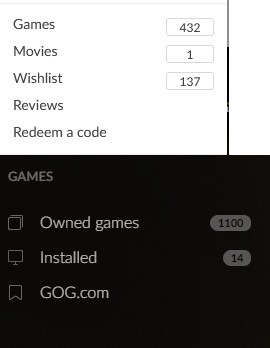
At some point in the past I’ve linked my Steam library to GoG Galaxy client, and now I can’t get the Steam games out of it. All the Steam games show up as “other” and so relinking and unlinking the Steam don’t help. I’ve also uninstalled the Galaxy with Revo uninstalled, removing all associated files, but the other games just repopulate my library. The GoG rep told me I have to manually remove those games one by one. There are literally hundreds and each takes multiple clicks to remove. Any advice? |
||
| 11 Original | |||
 zaisty
lemmy.world
zaisty@lemmy.world
zaisty
lemmy.world
zaisty@lemmy.worldJoined: 2026-08-31 |
Install once more GOG Galaxy and then install again steam plugin in GOG Galaxy. After that remove plugin connection from library and at the end uninstall plugin. You will have clean GOG library without steam games. I have done this twice in past years and it works. |
||
| 1 | |||
|
MolochHorridus
piefed.social
MolochHorridus@piefed.social Joined: 2026-02-09 |
Install once more GOG Galaxy and then install again steam plugin in GOG Galaxy. After that remove plugin connection from library and at the end uninstall plugin. You will have clean GOG library without steam games. I have done this twice in past years and it works.
This doesn’t work, because Galaxy has for some unknown reasons decided to label my Steam games as “other”. I’ve tried it, multiple times. |
||
| 1 | |||
| Post Reply |
Back to top |