Mobile phones - do you store your apps in folders or pages (screens)?
| Post Reply | RetroFed Forums Forum Index » Ask Lemmy |
| Author | Message | ||
|---|---|---|---|
|
Digitalprimate lemmy.world  RecursiveParadox@lemmy.world Joined: 2023-06-28 |
Mostly the title. I try to keep my apps inside relevant folders, but this is getting tedious. I'm wondering if it may be better to keep apps of one kind (e.g., maps/navigation) on their own screen and other apps (e.g., social media) on a separate screen. Is it easier to swipe by screen or to keep similar apps in folders? What do you think? |
||
| 9 Original | |||
|
GreyShuck feddit.uk  GreyShuck@feddit.uk Joined: 2023-07-17 |
I find it far easier to swipe to themed screens, each with a combo of widgets and apps. I have one folder for car parking apps and so on, which I use less often. |
||
| 2 | |||
|
TheLeadenSea sh.itjust.works TheLeadenSea@sh.itjust.works Joined: 2025-06-04 |
I have everything in folders on my home screen, I don't like swiping
|
||
| 8 | |||
|
nitrolife hikki.team  nitrolife@hikki.team Joined: 2023-06-28 |
Anything I use less than once every couple of days, I simply remove from screen and use the global app menu. It's easier for me to go there and use the app search. Things I use frequently, I keep on a couple of screens. If there are many similar apps, I keep them in folders with auto-sorting by last used, for example, messengers, pay apps, etc. The rest is just on the screen. |
||
| 2 | |||
|
kettuli lemmy.blahaj.zone  kettuli@lemmy.blahaj.zone Joined: 2026-10-13 |
I have three folders in the home screen so it can have Safari and look balanced. For apps not in the folders I use search. |
||
| 7 | |||
|
programmerlexi sh.itjust.works programmerlexi@sh.itjust.works Joined: 2025-08-29 |
I only have widgets on my home screen, but only for stuff i deem important enough (Auxio, Breezy Weather & Clock). |
||
| 2 | |||
|
zikzak025 lemmy.world zikzak025@lemmy.world Joined: 2025-12-24 |
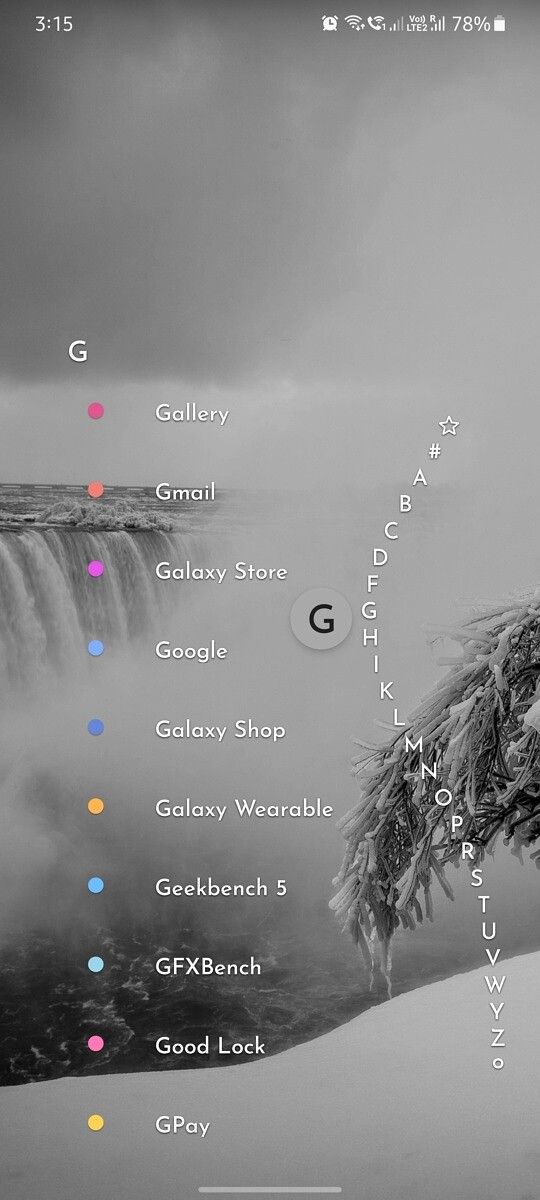
I use Niagara launcher, so all of my apps are in a single scrollable list. This isn't a screenshot of my own phone, but this is essentially what it looks like. There's an A-Z list on the right that you can use to jump to a specific letter, or just scroll down the full list on the left. You can keep a small list of favorites at the top. It does support folders, but I don't use them.
|
||
| 5 | |||
|
LeapSecond lemmy.zip LeapSecond@lemmy.zip Joined: 2025-11-12 |
Haven't thought about it but do both. Home screen is mostly for widgets. Left screen for social media and messaging without folders. Right screens have named folders with many apps I don't use often. |
||
| 2 | |||
|
LeapSecond lemmy.zip LeapSecond@lemmy.zip Joined: 2025-11-12 |
I have everything in folders on my home screen, I don't like swiping
4 games folders is... impressive |
||
| 7 | |||
|
TheFrirish tarte.nuage-libre.fr  TheFrirish@tarte.nuage-libre.fr Joined: 2025-11-16 |
I have three folders in the home screen so it can have Safari and look balanced. For apps not in the folders I use search.
Pretty neat but I'm not a fan of having to press twice to access messages. |
||
| 2 | |||
|
ReallyZen lemmy.ml  reallyzen@lemmy.ml Joined: 2023-07-09 |
Neither - I use KISS, which means a click on the first letter of an app brings every app starting with it, ordered by frequent use. With 6 shortcuts at the bottom I'm good, never more than 2 clicks away from anything. |
||
| 5 | |||
|
alk lemmy.blahaj.zone  alk@lemmy.blahaj.zone Joined: 2025-05-13 |
Neither - I use KISS, which means a click on the first letter of an app brings every app starting with it, ordered by frequent use. With 6 shortcuts at the bottom I'm good, never more than 2 clicks away from anything.
Kiss is great. I have the keyboard come up automatically and just type what I want to ooen |
||
| 4 | |||
|
MurrayL lemmy.world MurrayL@lemmy.world Joined: 2023-07-01 |
One screen of my most frequently used apps, no folders, and spotlight for everything else. It invariably surfaces whatever I’m looking for with just the first letter, so I don’t see the point in cluttering my phone with extra screens and folders. |
||
| 2 | |||
|
helpImTrappedOnline lemmy.world helpImTrappedOnline@lemmy.world Joined: 2023-10-09 |
I find it more practical to seperate by things you uses frequently vs things you use occasionally. I have 4 folders, "stores(&bank stuff)" "games(&entertainment)" "utilities(&misc)" and "work". It's all sorted alphabetical. |
||
| 5 | |||
|
crandall lemmy.today crandall@lemmy.today Joined: 2026-08-11 |
No folders. I gave up on that a long time ago. It is too much maintenance to organize everything and it doesn't really help you find things that much. I just scroll through the alphabetical drawer of all apps to find what I need. |
||
| 2 | |||
|
Fallibilist feddit.uk Fallibilist@feddit.uk Joined: 2026-09-15 |
I only have like 4 or five pages of apps. No much need in organizing them. I pretty much remember on which page the 4 apps are I regularly look for. |
||
| 2 | |||
|
kettuli lemmy.blahaj.zone kettuli@lemmy.blahaj.zone Joined: 2026-10-13 |
Pretty neat but I'm not a fan of having to press twice to access messages.
Messages that matter generate notifications and I usually have Messages open in the background. |
||
| 1 | |||
|
AstroLightz lemmy.world  AstroLightz@lemmy.world Joined: 2023-06-29 |
I only have 2 screens of apps. First page (Main) is all the apps I use frequently. The most frequently used apps are in places where I can easily reach while one-handed. Second page is apps that are used rarely. A lot of utilitity apps fall into this category. |
||
| 2 | |||
|
Maestro fedia.io  Maestro@fedia.io Joined: 2024-03-17 |
I have my 15-ish most used apps on my home screen. Anything else I access through the main app list. No folders or anything. But I do try to keep the number of apps on my phone low. I refuse to install a dozen store-bound savings apps and all that crap. I prefer mobile sites over apps anyway so my adblocker functions. |
||
| 4 | |||
|
Onomatopoeia lemmy.cafe Onomatopoeia@lemmy.cafe Joined: 2025-01-02 |
Use Macrodroid's Drawer (slides out from left side) and Folders from Jina Drawer. Jina can work with folders and tags to automatically sort apps. But that's how my brain works, I need the structure to find stupid apps with terrible names. |
||
| 3 | |||
|
ace_garp lemmy.world  ace_garp@lemmy.world Joined: 2023-06-09 |
Kvaetsitso One page of favourites, the search-based for other apps. |
||
| 4 | |||
|
SuiXi3D fedia.io  SuiXi3D@fedia.io Joined: 2024-03-04 |
Yeah, I use folders. Makes sense to me, but everyone’s different. |
||
| 1 | |||


| Post Reply | Page 1 |
Powered by RetroFed · PieBB frontend
· All times are Europe/Amsterdam