[Question] Virtual networking docker (bridge)
| Post Reply | RetroFed Forums Forum Index » Networking |
| Author | Message | ||
|---|---|---|---|
|
N0x0n lemmy.ml N0x0n@lemmy.ml Joined: 2023-12-28 |
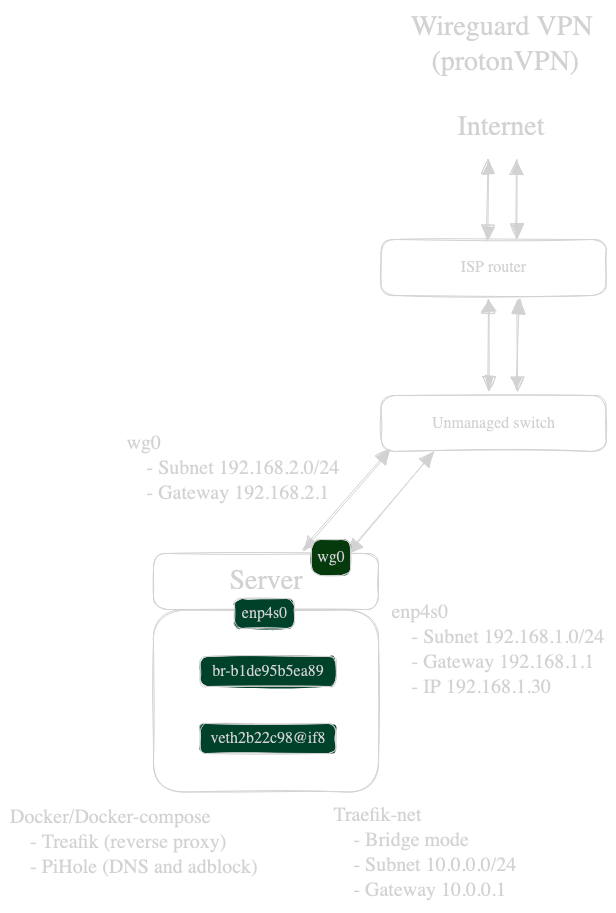
cross-posted from: https://lemmy.ml/post/15968883 Hello everyone ! Nobody seems to have an answer on !networking@sh.itjust.works (or maybe they are not interested because it's an enteprise network community?) and !homenetworking@selfhosted.forum seems dead? Anyway, If anyone could guide me or direct me to the right direction, I would really appreciate it ! TL:DR What is encapsulated into the frame that makes everyone understand: "OHHH that’s for 10.0.0.8, your docker container on bridge network br-b1de on the veth2b interface !!! " Hi everyone ! I'm scratching my head in finding an actual answer on how virtual networking in docker actually works (mostly on the packets/frame level) or some good documentation to improve my understanding on how everything fits together. Because I'm probably lacking the correct network terminology I made a simple network topology of my network. Don't hesitate to correct any network mistake.
In my scenario, my docker container with the virtual interface I probed every interface with tcpdump (enp4s0, wg0, br-b1,veth2b):
I know there is a mix of 2 different concepts in my scenario (wireguard tunnel and virtual networking) but I really do not understand how the frame gets back to my docker container. When I look at the frames on wg0, there is no mention of either the MacAddress of my container or the actual IP of my container. How/when/what ? is exactly happening to my frame so that it gets to the correct target between my physical interface, virtual interface, bridge ? I mean with VLAN's there's a VLAN tag on the frame, so you can easily identify with Wireshark where it should go. But here, I cannot find any clue who or what is doing the magic so the frame finds it's way back to my docker container. What is encapsulated into the frame that makes everyone understand: "OHHH that's for 10.0.0.8, your docker container on bridge network br-b1de on the veth2b interface !!! " Sorry for my broken English and lack of networking terminology and thank you for those who beared with me and are willing the give me some hints/proper networking lesson. |
||
| 1 Original | |||
| Post Reply | Page 1 |
Powered by RetroFed · PieBB frontend
· All times are Europe/Amsterdam