| Post Reply | RetroFed Forum Forum Index » Linux Mint |
| Author | Message | ||
|---|---|---|---|
 Auster
thebrainbin.org
Auster@thebrainbin.org
Auster
thebrainbin.org
Auster@thebrainbin.orgJoined: 2024-10-28 |
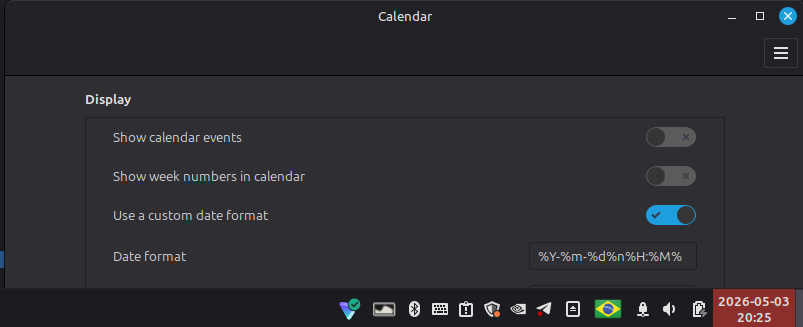
ISO8601-based custom date format in Linux Mint Right-click the calendar widget in the panel > toggle Seconds omitted because I don't have use for them, and Didn't test in other Debian-based systems. And iirc changing the locale to either Danish or Japanese also works, but then the system won't be in English. Hope this helps someone. =) #iso8601 @linuxmint@lemmy.ml |
||
| 24 Original | |||
|
Lupie
sopuli.xyz
Lupie@sopuli.xyz Joined: 2025-10-10 |
I remember having to look up the format rules to do exactly this when I first tried Mint. Astonished it's not one of the default options. |
||
| 7 | |||
 SocialistVibes01
lemmy.ml
SocialistVibes01@lemmy.ml
SocialistVibes01
lemmy.ml
SocialistVibes01@lemmy.mlJoined: 2026-04-30 |
I remember having to look up the format rules to do exactly this when I first tried Mint. Astonished it's not one of the default options.
Puzzling, right? https://en.wikipedia.org/wiki/Date_and_time_notation_in_France |
||
| 3 | |||
|
18107
aussie.zone
18107@aussie.zone Joined: 2023-07-04 |
I didn't know about I'm disappointed that my world clocks broke and only display UTC after upgrading to LMDE 7. |
||
| 1 | |||
|
flameleaf
lemmy.ml
flameleaf@lemmy.ml Joined: 2025-11-30 |
I remember having to look up the format rules to do exactly this when I first tried Mint. Astonished it's not one of the default options.
They're all listed if you type |
||
| 1 | |||
| Post Reply |
Back to top |